Frequently Asked Questions (FAQs)
Purpose and Terms of Use
What is Selwyn District Council's online booking system?
The Selwyn Recreation Portal is our online booking system designed to improve your experience with booking recreation classes and make managing your membership easier.
Key benefits:
- Convenience: Book classes and activities anytime, anywhere, without needing to call or visit.
- Easy to manage: Easily access and update your membership details and track your bookings in one place.
How will Selwyn District Council use the personal information I provide for my account?
Your personal information will be handled in accordance with our privacy policy:
What are the terms and conditions for using the online booking system?
Please refer to our terms and conditions:
Registration and Account Management
How do I register or signup?
Visit https://selwyndistrictcouncil.perfectmind.com/ page and click on 'Signup'
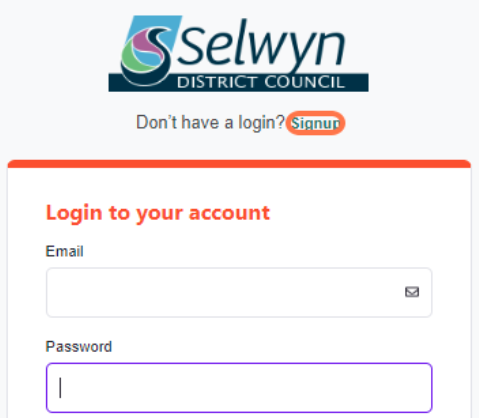
- Fill in the required details: first name, last name, email address, phone number, address, birthday.
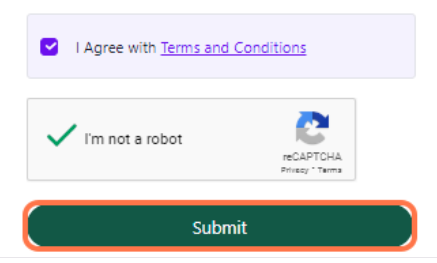
- Review and agree to the Terms and Conditions
- Complete the reCAPTCHA and click "Submit."
How do I set up an account for my family?
After you’ve logged in:
- Select 'Add Family Member' on the 'My Info' page
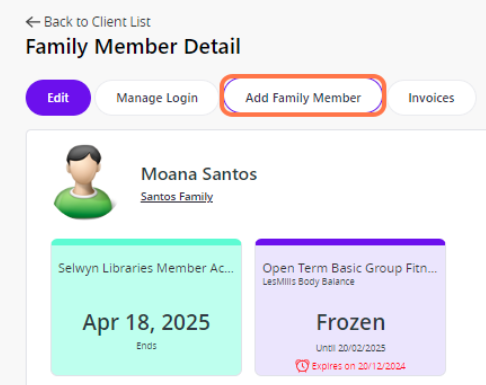
- Enter the family member's first name, last name, birthday, email, phone number, full address, gender and relationship.
- Click 'Submit' to complete.
How do I set up an account for my organisation?
Note only use this if you are happy for all account members to see each other’s details and have access to account credit. Your organisation may pay for employees’ Selwyn Recreation services without each employee being part of your organisation’s account. Your organisation can discuss tailored invoicing solutions by contacting selwynaquaticcentre@selwyn.govt.nz.
How do I reset my password?
Go to the Login page and click on 'Forgot Password'.

- Enter your registered email address and click 'Reset Password'.

- Check your email for a temporary password and follow the link back to the login page.

- Log in with the temporary password, set a new password and save changes.

I registered online but think I may have a previous account. How do I check and consolidate them?
Note Selwyn Recreation Portal won’t let you add an additional account with an email address that’s already in use for an account.
You can check to see if an account with your email exists: visit https://selwyndistrictcouncil.perfectmind.com/ page and click 'Forgot Password'. Then enter your email. You will receive a password reset email if an account already exists.
If you have multiple accounts that you’d like us to merge, please contact the team SelwynAquaticCentre@selwyn.govt.nz
Self Service
How can I get a 2-week FREE all-access trial to try all the group fitness and aqua classes?
The free trial is available to all new customers or those who have not held a concession or membership card in the past 12 months. Simply log into the Selwyn Recreation Portal and navigate to Buy > Memberships, then purchase an All Access Membership.
You can cancel within the first 14 days without any penalties if you decide it’s not for you.
Note: If you do not cancel within the first 14 days you will be billed from the next billing cycle.
How do I buy a membership or concession?
Login into the Selwyn Recreation Portal.
- Navigate to the Buy tab.
- Select either Memberships or Concessions.
- Choose your preferred option (e.g., Open Term All Access Membership).
- Click "Continue," review Privacy Policy and Terms & Conditions, then agree.
- Add to Cart and proceed with payment by entering debit or credit card details.


Note: You can also purchase memberships or concessions using Account Credit or Gift Card if available. Combined payment methods are also accepted. For cash payments, please visit one of our centres for assistance.
How do I view and book group fitness classes?
Click on 'Book now' to view types of classes available.
- Use filters to narrow down options by location, service, date, time, etc.
- Click 'Book Now' for more details about a class.

- Review fees and confirm booking by following prompts.
How do I book a Learn to Swim class?
View this page for more information.
How does shared account credit work?
All members within a family or organisational account can access shared credit; email notifications will be sent when members are removed.
How do I edit my information?
- Go to the 'My Info' screen then select 'Edit'.

- Update desired fields under General Information or Contact Information
ℹ️ Note email cannot be changed, contact or visit one of our centres for assistance.

- Select 'Save' to store the changes.
How do I join the waiting list for a class?
You can find all bookable classes and activities list in the 'Book' menu. When all bookable spaces in a class or activity are taken and a waitlist is available, then the button will display 'Waitlist'. Click on the waitlist button and follow the prompts to be added to the waitlist.

If a space becomes available you’ll receive an email to let you know and when you’ll need to confirm by. Accept within the time limit to secure your space. The next person on the waitlist will be offered the space if it hasn’t been accepted when the time runs out.

How do I change my child’s learn to swim booking to a different time/day?
- Check to make sure there’s a spot available in the time/day you want to swap to.
- Log into Selwyn Recreation portal and view your child’s schedule.
- Click ‘Switch to list view’.
- Click on Actions, then select Withdraw.
- If you’ve already paid in full, select Account Credit as the Refund Method. If you set up a payment plan, it will be cancelled automatically.
- Select 'Timetable not suitable' as the reason for cancellation.
- Click Withdraw.
- Book the new lesson. If you received credit when cancelling a previous booking you can use your credit to pay for the new booking.
How do I pay an invoice?
You can pay an invoice via the Selwyn Recreation Portal.
- Click on Invoices under My Info

- Click on Filters if you want to view selected invoices only

- Choose to pay in bulk by clicking 'Due Date' (Option A) or pay selected invoices by clicking the selected invoice/s (Option B) then click on Make Payment

- Click on Complete
Note: If you have you've previously added your debit or credit card, it will show as a default payment option. Otherwise, you can also add a new card. Should you wish to do split payment (i.e. debit/credit card and account credit) this is also possible. If you prefer to pay via EFTPOS card or cash, please visit us at Selwyn Aquatic Centre.

- Click on Receipt should you wish to see your past payments

How do I freeze a membership?
You can suspend any open term membership for a maximum period of 56 days each calendar year. The minimum freeze period is 14 days. During a freeze, you will not be charged any membership fees, but if you attempt to book a class during the freeze period you will be charged the casual rate.
You can request a membership freeze through one of the following methods:
- online request via the Xplor customer portal as shown below
- by completing a paper freeze request form at a group fitness counter
Please submit any freeze request at least 48 hours before you wish the freeze to begin.
- Log in to the Selwyn Recreation Portal

- Click on “Request Freeze Membership”

- Select the “Starting” and “Ending” date for the freeze
In this example, the freeze period runs from 1 to 31 May 2025. You can freeze for up to 56 days each calendar year with a minimum freeze period of 14 days.

- Optional: add any notes you wish to include with your request.

- Click on Save

- Your request will be visible

- You will receive a confirmation email when your freeze request has been implemented
A freeze request may take up to 48 hours to be processed.
If you require assistance, please email sports.centre@selwyn.govt.nz.
Class Attendance and Membership Management
What should I do when I arrive for a class I've booked online?
Scan your Selwyn Recreation membership card at a self check-in kiosk or check in with staff at reception.
What if I've lost my Selwyn Recreation membership card?
Contact customer services at reception for assistance. They can issue you a new one for a small replacement fee. This service is available at Selwyn Aquatic Centre, Selwyn Sports Centre, Lincoln Event Centre, Rolleston Community Centre and West Melton Community and Recreation Centre.
What if I want to buy a concession card using cash?
Please visit one of our facilities for assistance with purchasing concession cards using cash. Alternately, other payment methods are available such as EFTPOS, debit/credit card and gift card.
How do I apply for a discounted fee (eg. SuperGold, Hāpai Access, Community Services or Student rate)?
There are two ways to do this:
- Complete the application form on our website.
- Bring your card and visit one of our facilities. A member of the team will assist you to complete the application.
Once the team have verified your eligibility they’ll flag it on your profile so you can pay the discounted fee for any applicable class or activity when paying online or at reception.
If you’d like to pay the discounted fee for a casual swim at one of our pools, please show your card to a team member at reception.
How do I withdraw from a class?
- Go to 'Schedules' under 'My Info'.

- Select the relevant customer name, if applicable.

- Find the class you wish to cancel and click 'Withdraw'.

- Review withdrawal details before finalising.
Learn to Swim
How do I book a Learn to Swim class?
View this page for more information.
How do I change my child’s learn to swim booking to a different time/day?
- Check to make sure there’s a spot available in the time/day you want to swap to.
- Log into Selwyn Recreation portal and view your child’s schedule.
- Click ‘Switch to list view’.
- Click on Actions, then select Withdraw.
- If you’ve already paid in full, select Account Credit as the Refund Method. If you set up a payment plan, it will be cancelled automatically.
- Select 'Timetable not suitable' as the reason for cancellation.
- Click Withdraw.
- Book the new lesson. If you received credit when cancelling a previous booking you can use your credit to pay for the new booking.
What if I or my family member cannot attend a Learn to Swim (LTS) class?
Refer to our LTS Terms and Conditions regarding attendance policies.
Membership Termination and Refunds
What if I or my family member cannot attend a Learn to Swim (LTS) class?
Refer to our LTS Terms and Conditions regarding attendance policies.
What if I need to terminate my membership or concession?
You can terminate your membership by providing 30 days' notice to the relevant facility via the Selwyn Recreation Portal or in person. Please email us or visit any facility for assistance. We will process your request once we receive and acknowledge it.
How does the refund process work?
Refund policies are outlined in our terms and conditions: